
George cooking up a pot of Michael's potato soup!

George cooking up a pot of Michael's potato soup!

When I was a college student at The Ohio State University, I lived in the Phi Kappa Tau Fraternity house. My fellow frat brothers were a bunch of really good guys.  And the years spent in that house were some of the best of all my college days.  I made a lot of good and fast friends in that house. And I learned that Ohio is pretty darn big.  My fellow frat brothers came from all geographic corners of the buckeye state.

Guys came from cities that we all know.  Columbus, Toledo, Cincinnati, and Cleveland.  But they also came from towns I never heard of before.  Shadyside, Ironton, Van Wert, and Urbana (to name a few).

Urbana, Ohio.  For sure, while growing up in Cleveland, Urbana was a town I never even knew existed.

And, for some reason, Phi Kappa Tau attracted a lot of guys from Urbana.  Looking back, the frat house easily had a dozen or so members from this wonderful farming community just an hour or so northwest of Columbus.

Dave Warye, Mike Woodruff, Kym Moore, Steve Diebert, Gary Burris, the Michael Brothers (Scott, Todd and Kurt), and a whole lot of other guys all came from Urbana!

And through their friendship, I gained a whole new respect for farmers and farming.  And also came away with a great potato soup recipe!

You see, the Michael brothers have one of the largest potato farms in Ohio.  Now, I love potatoes and always have.  So, it was pretty cool having fraternity brothers who grew my favorite vegetable!  Their mom, many years ago, passed along a potato soup recipe that I handed to my mother.  Mom whipped up pot after pot of that soup. And with each bowl, it brought back memories of Ohio State, Phi Kappa Tau and Urbana.

Because of the Internet, Facebook, and email, I’ve been able to once again get in touch with all my Phi Tau brothers.

Todd, Kurt, Scott, and Jody of Michael Farms

Todd, Kurt, Scott, and Jody of Michael Farms

And, it’s wonderful to know that Scott, Todd and Kurt Michael are still operating the family farm. And you just know that all those potato recipes are tucked away for safe keeping. A Michael family tradition for sure.

With just a quick email request to Todd’s wife Jill, I once again had the Potato soup recipe in hand. I was elated because the recipe was lost someplace in my mother’s kitchen.

(Jill has kept the original recipe and refined it a bit combining it with a couple of others.)

Here then, straight from Jill Michael’s kitchen in Urbana,Ohio, is the famous Michael Family Potato Soup Recipe:
POTATO SOUP
6 medium Michael Farms potatoes (cooked in salted water)
2 medium onions (chopped) Add a few green onions if you would like!
1 and 1/2 quarts chicken broth
8 oz. cream cheese (chunked)
Salt to taste
1 tablespoon parsley flakes
3 strips bacon cooked and crumbled
2 drops tabasco sauce
1 teaspoon chopped chives and sprinkling of paprika for topping
In dutch oven, cook potatoes and onions in chicken broth.  Bring to a boil, then reduce to a simmer  and cook for 40 minutes.
Place the potato mixture in blender or food processor(take out potatoes for chunks if you like), add cream cheese, and puree until very smooth.  Add salt, parsley, and
tabasco sauce.  Pour mixture into crock pot then add chunked potatoes and crumbled bacon, stir.  Top with chopped chives and sprinkle with paprika.
Enjoy!

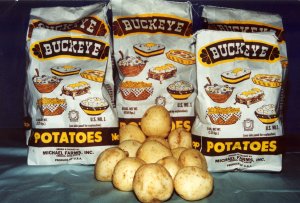
Michael Farms Potatoes.  The very best potato!

Michael Farms Potatoes. The very best potato!

Now, I have to tell you, the secret ingredient  to this potato soup is the potato itself.  It’s my humble opinion that this soup tastes best when Michael Farms’ potatoes are used.

Now that the days are growing shorter and evenings are getting cooler, it’s certainly the perfect time (and weather) for potato soup.  So, grab a bag of Michael Farms potatoes and  get out the pots and ingredients.   I’m willing to bet that when you sit down to a bowl of this potato soup, you’ll think of Urbana, Ohio, too.


Share

Today is the day to go to Chili’s restaurant. Doing so helps St. Jude’s Children’s Research Hospital. 100% of today’s profits go to St. Jude’s.

“As one of the world’s premier centers for the research and treatment of pediatric cancer, St. Jude Children’s Research Hospital® is renowned for its pioneering work in finding cures and saving children’s lives. Chili’s is proud to support this important cause through our Create-A-Pepper campaign. Each year we invite guests to create custom pepper designs and help St. Jude through individual donations. The annual campaign also includes a national one-day event where 100% of Chili’s profits for the day are donated to St. Jude.

“To date Chili’s has raised more than $30 million for the children of St. Jude. It’s because of the generosity of people like you that we are well on our way to our goal of raising the largest partner donation in the history of St. Jude — $50 million over a 10-year period. The money you’ve raised has helped change how the world treats children with cancer and other catastrophic diseases. Thank you for giving the gift of hope by supporting St. Jude.”

└ Tags: ,

Share
Don't let Windows strand you!

Don't let Windows strand you!

I recently phoned a friend to make sure he was aware of an upcoming event.   I had received an email reminding me of this event and wanted to pass word on to him. He told me that, yes, he knew about it.  I asked if he received the email and he said no. He’s not on the email list and didn’t want to be on the list.  He went on to explain that he doesn’t use email, avoids Facebook, all social networks, and anything that could potentially infect his system.

He runs Windows Vista.

He has anti-virus, firewall, and other security measures in place. But he’s just plain scared of doing anything that might trigger a virus attack.

The recent virus attack that hit ABC, Disney, Proctor and Gamble, and other corporations only solidified his position.

This is somewhat bittersweet.  On the one hand, my friend  has access to some of the most advanced technology the world has ever seen. On the other, he’s afraid to use it.  It’s a lot like having a really nice boat, but never leaving port.  You’re stranded.

How sad that many others are experiencing the same fear.  Because they run Windows, they have that fear, in the back of their mond, that their system might be infected or compromised while online.  Our computers enable us to receive information, communicate with the outside world, shop, bank, share photos, video, multimedia, and thousands of other things!  You shouldn’t have to be afraid of hitting a key on the keyboard or clicking the mouse!

This is one of the BIG reasons why I (and millions more) use Linux.  Linux is immune to Windows viruses, Trojans, and malware.

Give Linux a try. It’s friendly, easy to use, and lets you use your computer to its full potential online and off.

Linux. No fear.

└ Tags:

Share

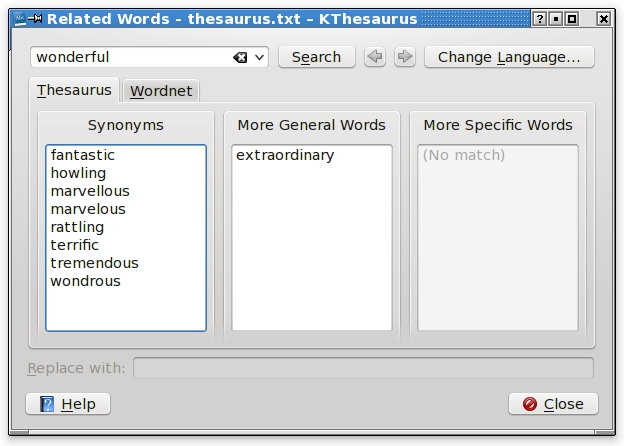
KThesaurus at work.

KThesaurus at work.

Trying to find the right word when writing?  Can’t seem to put your finger on the exact word to help express an idea?  Then, obviously,  you need a thesaurus.

But, if you run Linux, you’ll have KThesaurus at your fingertips!  KThesaurus is fantastic, grand, marvelous, terrific, tremendous, wonderful, wondrous and extraordinarily good!  It’s simply great! (See? I’m using it already!)

KThesaurus comes with the KOffice suite which is easily installed through a Linux repository (the online “warehouse” where you get all your Linux software for your Linux computer).

KThesaurus is also tied into Wordnet. Wordnet is a “…s a large lexical database of English,…Nouns, verbs, adjectives and adverbs are grouped into sets of cognitive synonyms (synsets), each expressing a distinct concept.”  In other words, Wordnet is a spectacular combination of both dictionary and thesaurus!

You can easily use Wordnet online.  But with when you run Linux, you’l have Wordnet available in a stand alone app (Kthesaurus) at the ready whenever you need it.

I have I KThesaurus on one of my tool bars.  It’s just a click away when I need to find a word. it’s quickly becominjg one of mymost valuble blogging tols.

So, get Linux and give KOffice and KThesaurus a try!  You won’t regret it. (You won’t lament, rue, bemoan or deplore it, either.)

└ Tags: , ,

Share

A typical partition of a Linux installation

A typical partition of a Linux installation. Click to enlarge

This tip can save you some time and a little bit of frustration as you grow with Linux.

I’ve used Linux for over six years now. I’ve installed and run many different Linux distributions. These include Linspire, Freespire, Kiowa, PCLinuxOS, Ubuntu, Mandriva, Linux Mint, and few others that escape my memory at the moment.  After running so many, it became a routine operation to install Linux to my system’s hard drive. Mostly because, Linux distributions come with a very easy step-by-step menu on its installation disk. Just read the directions on screen and click the “next” button. Linux does the rest.

However, during those earlyyears when I was learning Linux, I was installing everything to one main partition on the hard drive. The root directory (where the OS resides, also designated by “/”) and the home directory(where all my personal files reside, designated by “/home”) were always installed on the same partition. This means, whenever I upgraded my Linux system, I had to overwrite everything on that partition (hard drive).

The goal is to keep personal files, folders, and data intact and only upgrade the Linux operating system.

The solution is to simply do the following: Before you install Linux, partition the hard drive into three pieces. One for the root directory (which contains the actual Linux operating system), one for the home directory (this is where you keep all your personal files, data, and stuff you work on), and one small partition for swap (swap is extra memory for Linux).

At some point, if you need to upgrade or reinstall Linux, and because you have the hard drive divided into these three pieces, you’ll only need to install to the root directory partition. All your personal files and data on the home directory partition will remain intact. (but it’s always a good idea to back up all your files before upgrading or reinstalling any operating system).

Most Linus installation disks come with a partitioning utility.   You can use it to partition and format the hard drive.  You can get more information on how to partition a hard drive and see a step by step tutorial on installing Linux here.

Get Linux.

└ Tags:

Share

