
To follow up my post discussing digital tools, here’s a quick look at how I use GIMP to edit my George comic strip.
”Comment
To follow up my post discussing digital tools, here’s a quick look at how I use GIMP to edit my George comic strip.

In a previous post, I discussed some of the tools (pens, pencils, paper, etc.) I use to create my comic features. Today, I’ll discuss some of the digital tools I use in the studio.
Since I ‘m still a bit of a traditionalist and draw all my cartoons on paper, I need a way to get them into my computer. That’s were a good scanner comes in handy. I like scanners that have a large plate area for scanning. I draw my comic strip George in dimensions 4″ x 13″. So, it’s nice to have a scanner with a scanning bed at 14″ or more.
I’ve had a HP ScanJet 8250 Document Scanner
You really can’t go wrong with any of the HP Scanners. I really like the newer All-in-One models. I’ve also used a couple of the Brother All In One scanner/printers. Again, I tend to gravitate to models that give me a bit more space for scnning larger/longer images.
When I travel or find myself away from the studio, that’s when I bring out my VuPoint Solutions Magic Wand Portable Scanner
This thing is great! It’s especially nice for scanning my comic strip. I simply lay the strip on a flat surface and slowly pass the scanner over it. Done. Fair warning, scanning longer images requires a steady hand and keeping the scanner as straight as possible. Otherwise, the scanned image tends to have a it of a bend or distortion.
But, that’s why we have digital imaging software.
The big dog on the block is, of course, Adobe Photoshop Elements

You don’t have to stick with Adobe photoshop. There’s Corel PaintShop Pro X7 Ultimate
If you’re on a budget and want something that doesn’t cost one cent, then get GIMP. GIMP (Gnu Image Manipulation Program) is the “Photosop” for the Linux platform. GIMP comes alredy installed when you install Linux. But it is available for Windows and Mac as well. It feels and runs just like Photoshop, Paint Shop Pro and other digital imaging software. It’s 100 percent free and quite powerful. There’s also a free online manuals to help get you started. if you prefer to have a bok in hand, amazon has several. The Book of GIMP: A Complete Guide to Nearly Everything has gotten some great reviews.
I’m a Linux user and I use GIMP. Linx and GIMP are every bit as easy and powerful as Mac/windows running Photosop. But, it really all comes down to personal preference and of course, the number of dollars you have to spend.
In future posts, I’ll share how I use some of these programs to create and enhance my cartoons.
As a cartoonist, I get this question a lot. Folks want to know which tools I use to create my comic and cartoon features.
I’ve tried and sampled lots of different pens, pencils, digital software applications, operatings systems, paper, Ink, etc. So, I’ve got a lot of experience with what works and what doesn’t.
Ultimately, it comes down to tools that allow me to get it down on paper as fast as possible, then converted digitally for editing and electronic delivery.
The best place to find any of these tools is amazon.com. I buy all my art tools at amazon. I’ve found that there is absolutely nothing they do not stock.
Here then is a short list of the drawing and cartooning tools I use with links directly to amazon.com so you can try them out youself.
Pens.
I’ve used a variety of pens over the years. I love using Pen and Ink, but the drying process takes too long. I like to draw and then slap the finished inked cartoon on my scanner ASAP.
First up is the Tradio Pen by Pentel. This pen’s nib has a terrific feel, just like Pen and Ink. The nib throws down a wide variety of line thickness and the ink is nice and black and dense. Plus, it dries quickly and will not smear. You’ll find yourself burning through refills, so make sure to stock up.
Pentel Arts Tradio Stylo Sketch Pen, Black Ink, Pack of 1 (TRJ50BPA)
Pentel Arts Tradio Stylo Sketch Pen Refills, Black, Box of 12 (MLJ20-A)
Years ago, I wore to B.C. cartoonist Johnny Hrt and asked him what kind of pen he used to create his famous comic strip. he kindly sent me back this pen:
Eberhard Faber Hard Point Plastic Tip Pens, Black Ink, Fine Point, Dozen – 33041
This is really a remarkable pen. it’s better than a Flair in that the pen nib won’t mash down and soften over time. I find myself grabbing this pen to use on my features Double Take and I Knew That! The pen lays down a nice clean, crisp line that won’t smear. In seconds, I can place the finished carton on a scanner without worry of having black ink run all over the plate-glass scanning area.
Pencils
I draw with non-photo blue type pencils. I don’t lke having to erase pencils lines after I ink. As I said, I learned a long time ago from the late veteran Crock cartoonist Bill Reichin to “get it down on paper as fast as possible.”
That’s why I use the Dixon Ticonderoga Blue pencil.
Ticonderoga Erasable Checking Pencils, Eraser Tipped, Pre-Sharpened, Set of 12, Blue (14209)
With traditional non-photo blue pencils, I’ve found that the lead it not dense enough to actually see the lines drawn on paper when viewed under the flourescent lights on my drawing table. This Ticonderoga pencil has just enough density so I can see the lines and yet they drop out when I scan as a black and white image. No erasing, no erasure crumbs, and no extra time needed. I ust layout my cartoon with this pencil, then grab the of the pen mentioned above, ink the lines, scan and I’m done!
Paper
I draw my comic strip 4″ x 14″. I also lay out my own comic strip template using a desktop publishing program. (More on this in a future post). So I use a large 11 x 17 inch paper to print out the template. After i have it printed, I can then get down to the business of drawing. I’ve found the HP papers to be the best. They are thin enough to run through a desktop printer and really hold pencil and pen lines. Years ago, a cartoonist would be working with a heavy bristol board and pen and Ink, dipping he nib into an ink well. These newer inkjet papers have really changed the process. since they hold ink from an inkjet printer, they have no problem holding ink from any number of diffrent art pens.
HP Multipurpose Ultra White, 20lb, 11 x 17 Inch, 96 Bright, 500 Sheets/1 Ream (172001)
That covers pens, pencils and paper. In my next blog post, I’ll discuss some of the digital tools I use. If you have any questions, feel free to drop me an email at georgetoon@gmail.com.
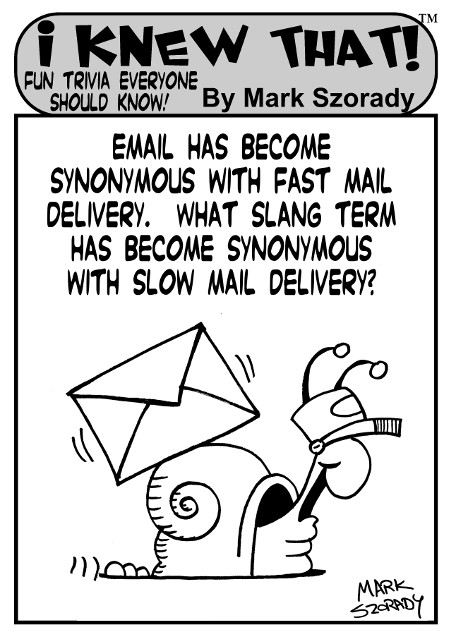
Today’s “I Knew that!” celebrates the lines of communication, both old and new.
Copyright 2015 Mark Szorady. Distributed by georgetoon.com
Answer: (Click, hold down, and move your mouse to the right of the arrow to reveal the answer)===============>SnailMail
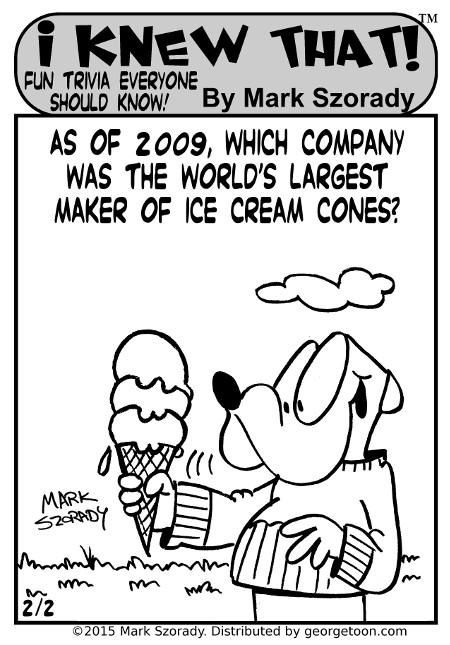
It’s summer and that means cool treats! Today’s “I Knew That!” celebrates those fun summer icy delights!
Answer: (Click, hold down, and move your mouse to the right of the arrow to reveal the answer)===============>The Joy Ice Cream Cone Company

| M | T | W | T | F | S | S |
|---|---|---|---|---|---|---|
| 1 | ||||||
| 2 | 3 | 4 | 5 | 6 | 7 | 8 |
| 9 | 10 | 11 | 12 | 13 | 14 | 15 |
| 16 | 17 | 18 | 19 | 20 | 21 | 22 |
| 23 | 24 | 25 | 26 | 27 | 28 | 29 |
| 30 | 31 | |||||


