My cartoon drawing with areas of gray added.  I filled these using the bucket tool.

My cartoon drawing with areas of gray added. I filled these using the bucket tool.

There are lots of graphics software applications out there.  Photoshop is the big dog on the block and many professional artists, cartoonists, and film makers use it for a variety of tasks. There are also graphics applications that rival Photoshop and do just about as much as Photoshop but a t a lower cost.  It all depends on the job you’re tackling and how many digital tools you require.

I’ve found that The Gimp does just about all I need when producing my comic features. And the costs is much less than Photoshop.  Gimp is free. And because I use Linux, The Gimp already comes pre-installed. When you install Linux, Gimp is right there ready to go to work for you.

Gimp has all the neat little filters, bells, and whistles that all the other graphics software apps have.  I use ’em all, but one filter, specifically, comes in quite handy when drawing cartoons.

It’s called “Newsprint.” The  Newsprint filter will convert a gray area in a pattern of dots or lines to line art.  it’s similar to the Zipatone used by many a cartoonist years go.

Zipatone was a sheet of plastic that had a pattern of lines or dots printed on it. It had an adhesive back.  If you wanted to add a gray shaded area to your cartoon, you’d cut out a large swatch of Zipatone, lay it down over the area of the cartoon,  then pull out your Exacto knife and cut and trim around the shape that needed shading.  It was a pretty long process.  Now, the Gimp does it in a few clicks.

Get the Gimp and I’ll show you how. You can download Gimp from their web site. (If you run Linux, no need to download and install.  It’s already on your system.  You’re good to go.)

First, open your cartoon. Make sure it’s a grayscale image.  You can do this by selecting Image>Mode>Grayscale from the menu.  Next,  find the area you want to use the Newsprint effect on.  Using the bucket or brush tool, fill that area with a shade of gray.  You can see how I’ve done mine in the image at top left. this is a cartoon drawing I’m using for my Word Pile cartoon game panel.
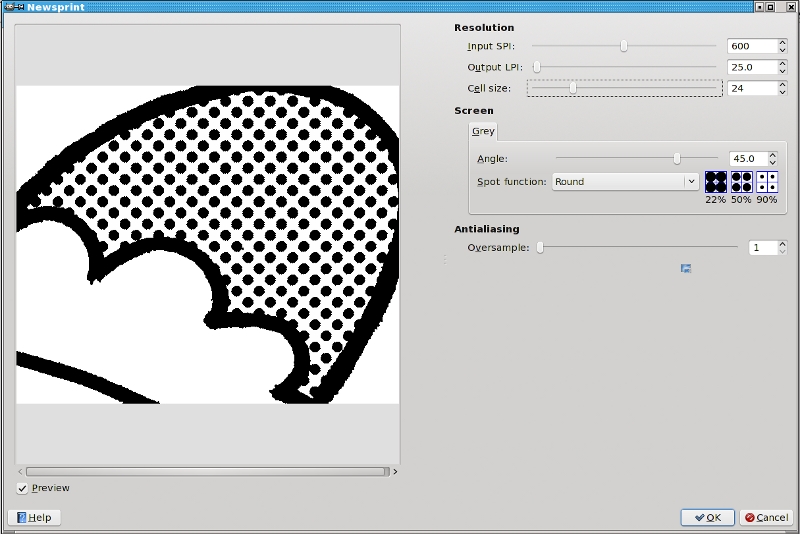
The Newsprint screen with sliders used for adjusting the effect.

The Newsprint screen with sliders used for adjusting the effect.

Next, use the Wand select tool and select the area of gray you want to use the Newsprint effect on.   (I use the wand tool if I want to convert more than one area on the same cartoon drawing with different patterns. Otherwise, you can just go straight to the filter.)  You should now have the “marching ants” line around the area you want to convert.

The cartoon with the completed Newsprint effect.

The cartoon with the completed Newsprint effect.

Now, simply go to the menu and select Filters>Distorts>Newsprint. a new window comes up with a real time preview screen. Play with the sliders to control the size, shape and angle of the line or dot you want to lay in.

Click OK and Gimp does the rest!

You can see the completed effect at left.  Just by using the bucket fill tool, filing an area with gray, and then using the newsprint tool, I’ve saved myself a lot of time!  I don’t need to draw a lot of shading lines and dots. Gimp does it for me!  Plus, if I don’t like it, I can always go back and change it with a click of the mouse.

Do you have a creative, aspiring cartoonist in your family? Then get Linux and get the Gimp!  Gimp is powerful and feature rich and FREE!  Plus, Linux is much more stable and secure than Windows. And Linux is immune to Windows viruses, Trojans and spyware.

Linux and Gimp. I use them both in my studio.


Share

geek

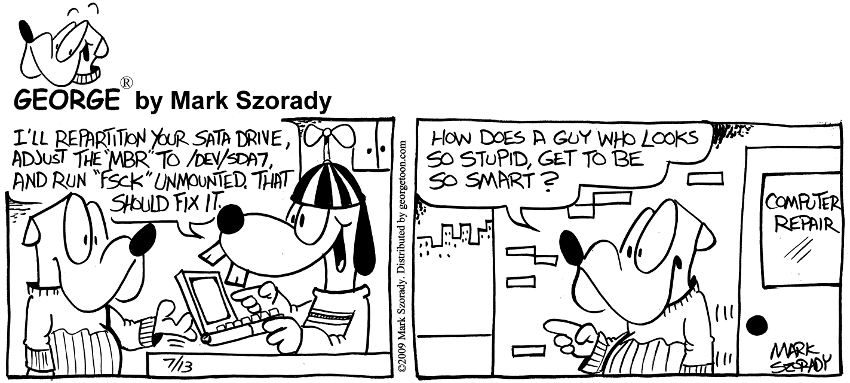
The comic strip at left is a stereotypical gag dealing with computers and the whiz kids who know how to fix ’em.  It’s all in fun.

The thing is, folks picture me just like the geeky computer brainiac in the comic.  But, really, I’m not a Linux geek.  Sure, I run Linux, but I’m not sitting at my computer hammering out hundreds of lines of computer code. I’m not.

When I run Linux, I’m pointing and clicking just like anyone else would do in Windows or Mac.  That’s it.  Linux is that easy to use. No kidding.  I’m running Linux at the same level and understanding as I would run Windows or Mac.

Granted, since running Linux, I’ve learned more about my computer, its hardware,  and the way the OS works. But this would be the same if I ran Windows or Mac.

It’s like this…with each operating system you’re going to have to learn something.  How it works, the “moves” around it’s desktop and GUI, how to install software, etc.

In addition:

With Windows, you’re gonna have to learn about anti-virus software, virus threats, and malware.  And you’re going to have to shell out some hard earned cash to buy this additional protection.

With Mac, you’re going to learn that you’re locked in to Apple hardware for sure.   Granted, Apple makes the hardware, OS, and software to work seamlessly, but it’s gonna cost you.   Mac is simply more expensive.  Buy a Mac and you’ll learn to part with your cash.  (If you have the cash, and don’t mind, well God bless ya.)

With Linux, all you have to learn is, well, Linux. And the cost is, well, free.

So which of the three would you prefer to learn?

Get Linux.

(Editor’s note: This article by Mark Szorady is a reprint from a blog post that previously appeared on oneclicklinux.com.  We felt it would be informative here on georgetoon.com.)


Share

What the heck is this blog about?  Well, you may have asked yourself this question based on how I’ve jumped around from subject to subject.   So, I’ll give you a review of what to expect.  I’ll try and update this bog overview at the beginning of each new year as a reminder to current readers and an introduction to new readers.

George Comic Strip

I’m a cartoonist. So, this blog mainly serves as a showcase for my comic strip George.  George was syndicated to 1600 weekly newspaper by King Features during the 1990s.  After that, it moved over to DBR Media.  Now, it’s nationally syndicated by Georgetoon, Inc./Georgetoon.com.

In addition to drawing George, I draw four other features for Georgetoon.com.  Double Take, Word Pile, George’s Word Ladder and I Knew That!.  You can get a PDF sample of these features here.

The George strips that run come directly from my archives.  (All the new stuff is reserved expressly for newspapers.  If you don’t have George and all the other features in your local paper, give them a call and ask for ’em.)  If you look to the right of the George comic strip, you’ll see a little comment balloon called “Strip Notes.”  This is where I leave commentary about the strip.  Mostly, it deals with what I was thinking during the creation of the strip or how I came up with the idea, etc.  I’m hoping it gives you a snapshot of the creative process I go through when putting together  a comic strip.

Behind the Scenes

I’ll be sharing some of my work methods.   I’ll post sketches, thumbnails,  and the day to day doodles. these are the processes that  that help me meet my deadlines. I’ll also talk aobut some of the software apps I use when refining and finishing a cartoon.   Which brings me to…

Linux

I’m a Linux user.  My brother Dave considers me to be “The Linux Cartoonist.”  He doesn’t know of many cartoonists who are as enthusiastic about Linux as I am.  In fact, I don’t think he knows of any cartoonists who use Linux .  Because I’m using Linux every day, I like to tell people how great it is.  I like to talk and highlight  the advantages of using Linux over Windows, and even Mac.  Folks are pretty amazed to hear  that I’m using Linux to produce cartons.  They automatically assume that, beaue I’m a  cartoonist, I use Mac or Windows.  Well, that’s the point of blogging about Linux here.   To tell folsk that Linux is sed by a lot of creative people to produce professional work. you can use it , too!  Besides, Linux is FREE.  And being free makes it  worth a try!

Technology

This topic sort of falls under the Linux category. But I won’t limit myself to just blogging about new developments in Linux.  I’m intersted in any and all new tech devices that are being introduced in the marketplace. I’m sure you are, too. Well, when I come across something, I’ll  post it here.

Animation, Movies, Fun Clips, and random silliness

Friends and family email me a lot of links and other fun stuff.  Friends on Linux forums also post a lot of interesting articles, videos, toons, and other fun stuff.   It runs the gamut from being informative to plain downright funny and entertaining.  When I come across something that makes me laugh or smile, I figure it’ll make your day, to.  I’ll share it here.

Here’s one as an example of what to expect. (BTW, for all U.S. readers, I’m told by friends across the pond that “Orange is one of the largest mobile services providers in Europe (except for Germany). “


So, that’s about it.  The Georgetoon blog is first and foremost a showcase for my comic strip George.  But, I’ll add other cartoons, sketches, and stuff related to George and my comic strip work.

Again, my sincere thanks to you for stopping by.  I hope you visit every day and often.


Share

NewYear2011After uploading comic strips to this blog for the first two weeks in January, I noticed that I forgot to change the copyright from 2010 to 2011. How many times will we fail to write “2011” and instead, accidentally continue to write “2010” in the days ahead?  Well, it happened to me at the digital level.  The copyright that I  digitally drop in read, “© 2010 Mark Szorady.  Distributed by georgetoon.com.” It should have read, “© 2011 Mark Szorady.  Distributed by georgetoon.com.”  This is the little bit of print that runs vertically in the comic panel’s gutter.

Whoops.

As I’ve mentioned before in this blog, in preparing art for my comic strip George and cartoon other features, I make extensive use of digital tools.  And these tools come directly from Linux. And I use only  Linux applications like Gimp and Scribus to help produce my cartoon art.  (My brother Dave says that before long, I’ll probably be known as “The Linux Cartoonist.”) Both of these applications come pre-installed, or easily obtained from a repository, in Linux.  And that’s what is so absolutely wonderful about Linux.  These tools are available to everyone! You don’t need to lay down thousands of dollars to purchase “professional level” software. Linux software gives you the same results and are just as easy to use.

And those tools came in quite handy in correcting this minor error.

I noticed my mistake a few hours after the upload.  I needed to correct things. I opened Gimp and it was a simple matter of a couple of clicks.  I dropped a “1” over the “0.”

Do you have a budding artist or cartoonist in your family?   Then download Linux and install it on a spare computer. All these digital graphic tools will be right there when you boot up!   They’ll be able to create to their heart’s content.  And Linux is immune to Windows viruses, Trojans, and spyware.    In addition, Linux is more secure than Windows.

And the best part.  Linux is free.

It’s 2011!  Ring it in, creatively,  with Linux!


Share
Lke this snail, Windows is just plain slow!

Lke this snail, Windows is just plain slow!

As many readers of this blog already know, I love radio!  I listen to the radio in my studio when I’m at my drawing table or in front of my PCLinuxOS computer.  I have an internet radio, so I can dial in stations from all over the country and even around the world.

Lately, I’ve been hearing the same few radio commercials over and over again for online products that allow users to speed up their PCs and improve its performance.  They promise some sort of online diagnostic that will clean up your windows system and unclog whatever is slowing it down.

I sometimes have my doubts as to their legitimacy or if they even work.  Heck, I’m not sure what the cost is, but I’d guess it’s in the $20.00 to $40.00 range. I’d be wary of downloading any kind of program and installing it on my windows system without first doing a lot of research.   You could be doing more damage to your system than you are aware.

If you REALLY want to speed up your computer, don’t run Windows, run Linux instead!

Like the snail above, Windows is slow.  This is because Windows slows down over time due to repeated software installations, fragmentation of the hard drive, and numerous anti-viruses and anti-malware programs running in the background. Not to mention the times when Windows has to update itself due to security problems.

Linux doesn’t have any of these headaches.  It’s immune to Windows viruses so you don’t need to run numerous anti-virus programs in the background.  A Linux hard drive doesn’t have to be defragmented.  It handles files and software much more cleanly than Windows.

Linux simply performs better and faster than Windows.  And Linux is free.  So you don’t have to pay  a licensing fee to Microsoft, a maintenance fee to an anti-virus software company, or a repair fee to any of these these ‘Supe Up my computer” web sites.

Get Linux and always run fast.


(Editor’s note: This article by Mark Szorady is a reprint from a blog post that previously appeared on oneclicklinux.com. With the start of the New Year, we felt it would be informative here on georgetoon.com.)
└ Tags: , ,

Share