After you're done digging out, download Linux!

After you're done digging out, download Linux!

Note:  I’m filing this blog post on Sunday, December 12, 2010…before the storm hits.

Double Note: I recommend installing Linux to an older system in order to try it out.  Find a system that you no longer use.  If you install Linux to your main system you’ll be overwriting Windows’ files and directories. In short, you will lose data!  Install Linux to a secondary system and keep your current Windows system.

The Midwest is getting blasted with its first big snowstorm of the season.

In Minneapolis, the roof of the Metrodome collapsed under the weight of all the snow that dumped on the area.

As of this writing, we’re still bracing to see if the storm makes its way into our neck of the woods.  I’m guessing that by the time this blog post runs, we’ll also be digging out from all the snow that has fallen.

The weather forecasters will probably recommend that we all stay  off the roads. Auto travel will be hazardous.  Roads will be snow covered and icy.  We’ll simply just have to shovel, sit, and wait it out.

So, after you’re done shoveling, plowing and snow throwing, you’ll have plenty of time on your hands.  The internet will beckon.  If you still have power, you’ll be surfing the internet, getting news updates, emailing friends, etc.

Now is the perfect time to try Linux! Get over to distrowatch.com and download an ISO of any Linux distribution.  I recommend PCLinuxOS or Linux Mint.  Once you have the ISO downloaded, it’s a simple matter of burning it to a CD or DVD disc.  You can get directions on how to do this from YouTubeOne youtuber has a pretty good video on how to do this including instructions on getting a free Windows software application to help burn the iso image.

The quick instructions to do this are as follows:

Download a Linux ISO
Burn it to a blank CD or DVD
Reboot your Windows system with the burned Linux disk in the drive
Run Linux (from the Disk)

You’ll be running Linux right off the disk!  This way, you can test your system’s hardware to make sure that it’s compatible with Linux.

Once you’re happy with the way things work, you can install directly to your hard drive.  Most Linux distributions have this option right on the desktop.

Again, as I emphasized above, tryout Linux on an older system.  Nowadays, everyone has an older system sitting idle in the corner and gathering dust.  Fire it up and give Linux a try on that unused computer. Linux will breathe new life into it!  Plus, you can then compare Linux and Windows side by side.

You might as well.  Like the rest of us, you’re snowed in.

└ Tags: , , ,

Share
A doodle/sletch I created several years ago for a New year's Eve comic strip. it's been in my doodle pile for years. i still haven't used it, but yanever know.

A doodle/sletch I created for a New year's Eve comic strip. it's been in my doodle pile for years. I still haven't used it, but ya never know.

It sounds cliche, but the question most often asked of cartoonists really is, “Where do you get your ideas?”  I get the question quite often myself.   Answering it always makes for a fun discussion with a reader or comic fan.  And there’s no way to answer it definitively. The idea process for just about anything created in the arts or industry takes many different paths.

Similarly,  my ideas for my comic strip and other features come about in a variety of ways.  I get ideas through observation, scanning newspapers and news sites on the web, playing around with a word combination or famous phrase, and having things just pop into my head (the easiest and best way to get an idea, by the way).

But  the main method I use is to just sit down and start doodling. I grab a pen or pencil and start sketching my characters or other cartoon figures.  I just sort of let go and let the pencil take me away.  Sometimes when I start a drawing, I really don’t know where it’s leading.  It may not amount to much at all.  Or, it may offer a spark of inspiration that leads to a final comic strip or comic panel.

And these doodles become pretty valuable. I have piles of them sitting next to my drawing table. If I like a doodle or sketch, but it doesn’t bring forth an idea, I’ll put it in a pile and tuck it away for awhile.  It may be months later that I’ll come across the doodle. Looking at it a second or third time may be the moment that a completed comic strip idea comes into focus.  Or, I may add to the doodle and tuck it away once more.

The frustrating part of the process arethe times I don’t makea quick dodle or sketch.  I’ve had many an idea evaporate because i failed to put it down on paper.  i tel myself that I’ll remember the idea,but later when I try to recall it, it’s gone. maybe gone forever.

This doodle eventually became a Double Take comic game panel.I havebn't thrown it away because I like the sketchy puirty of the drawing.

This doodle eventually became a Double Take comic game panel.I haven't thrown it away because I like the sketchy purity of the drawing.

Over the years, I’ve learned to never let an idea go.  I try to jot it down immediately.  When I get back to the studio, I pull out the papers from my pockets and go through the various doodles.  I then draw ’em up or put ’em in my doodle piles.

I think the next step in this process is to take it into the digital age.  I really need to start scanning these doodles and tag them with key words.  Many graphics catalog/browser programs do this.  Linux has several like GQview and Digikam that allow you to browse and tag image files. Tagging images allow you to search by the keyword.

But, I still like grabbing the pile and going through the sketches and doodles one by one.  Sometimes, it’s a nice break from the computer screen to just sit back in my studio chair and thumb through a pile of thumbnails.


Share

Ring in the New Year with the Georgetoon exclusive Happy New Year Sweatshirt! Here’s the actual comic game panel “I Knew That!” which is syndicated nationally to newspapers. The “I Knew That!” comic game panel appears in full color and features a very timely question/piece of trivia regarding the upcoming new year. It’s sure to be a conversation starter at this year’s New Year’s Eve party!

And, I  have to tell ya, I love drawing this feature!  I came up with the idea when trying to create something that would be entertaining to everyone and yet easy enough for anyone to play.  “I Knew That!” is usually the response someone has when they hear the answer to an incredibly easy question.   The answer sits on the tip of their tongue or in the back of their mind,but they aren’t quite able to grab it.  When they hear the answer, the reaction is usually a head slap to the forehead and exclaiming, “I knew that!”

(If your newspaper doesn’t run I Knew That!, give them a call or send them an email and ask for it!  Just send them to georgetoon.com and we’ll help them get I Knew That! in your local paper!)

So get the I Knew That! New Year’s Sweatshirt and watch everyone wrestle with the answer this New Year’s.  When you give them the answer, they, too, will yell out, “I knew that!”

Get all Georgetoon products, shirts, mugs, and stuff in the Georgetoon store.  Just click on the Shop link above, or on any image in the box below.


create & buy custom products at Zazzle


Share

googleI use Google.  You use Google.  Your family uses Google.  The neighbors across the street use Google.  Heck, EVERYONE on the planet uses Google!

Ever wonder what Google uses when it Googles?

Well, it ain’t Windows, that’s for sure!

Google has banned the use of Windows on all it’s office systems.  From now on, it’s either Mac or Linux in Google’s offices.  Windows is getting the boot because of one simple reason. Security.  Windows just doesn’t give Google the kind of security and protection from Viruses and hackers that it needs and requires.

Yes, Google is becoming a Windows’ competitor by launching its own Operating System. So, some may say it’s more a move to market and push its own OS.  Maybe.  Still, Windows has consistently proven itself to be insecure and vulnerable.  But, I have to admit, the world runs on Windows.  And, if you’re in business, you need to have Windows. There’s thousands of business software applicatins specifically written for Windows.

But, Linux gives you the best of both worlds.  (andi’l bet google kows this)  When running  Linux, install Virtualbox. Then  install and run Windows in a virtual environment.  I do it this way to handle the business end of Georgetoon.  it gives me the security of Linux along with access to business applications that are Windows specific.

New Year’s Eve is fast approaching. make a resolution to give Linux a try . Google is.

└ Tags: , , ,

Share
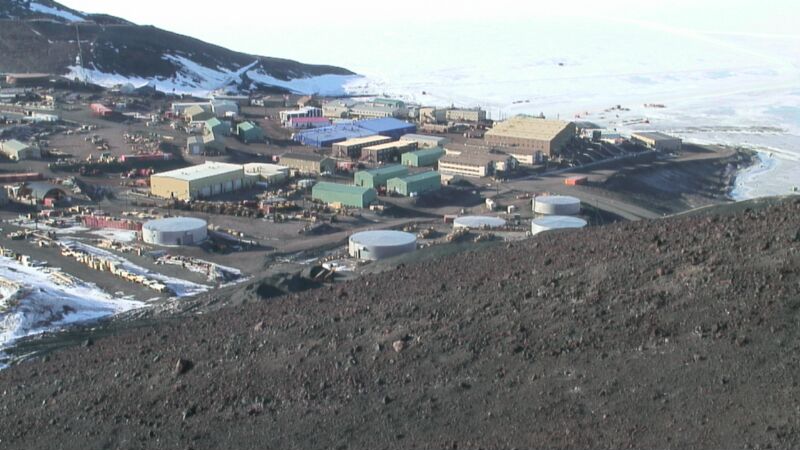
McMurdo Station

A still image taken from the McMurdo Station WebCam.

Since officially launching on July 14, 2010, the Georgetoon blog  has recorded over 326,000 hits with more than 62,500 page visits (so far)!

The Georgetoon blog has been visited by folks from every corner of the world!  Visitors came from North America, South America, Europe, Asia, Africa, Australia, and…well read on!

Dusty Schroeder, one of the researchers stationed down at  McMurdo Station, Antarctica, paid a visit to the blog and posted a comment.   Because of this, we can officially state that the blog has hit all seven continents!

Georgetoon in Antarctica!  How cool is that??!!

Thank you, Dusty!

If  you’d like more information on McMurdo Station and the work that Dusty and others are doing down there, visit The Antarctic Sun, an online news site about the USAP (United States Antarctic Program).  You can also visit McMurdo Station’s  live webcam.

Lastly,  you can get a great overview and brief history of McMurdo Station at Wikipedia.

Again, out sincere Thanks to dusty for taking the time to drop in and post a comment.

Enjoy the Arctic summer, Dusty!  And please tell everyone at McMumurdo thanks for their work and service!


Share