
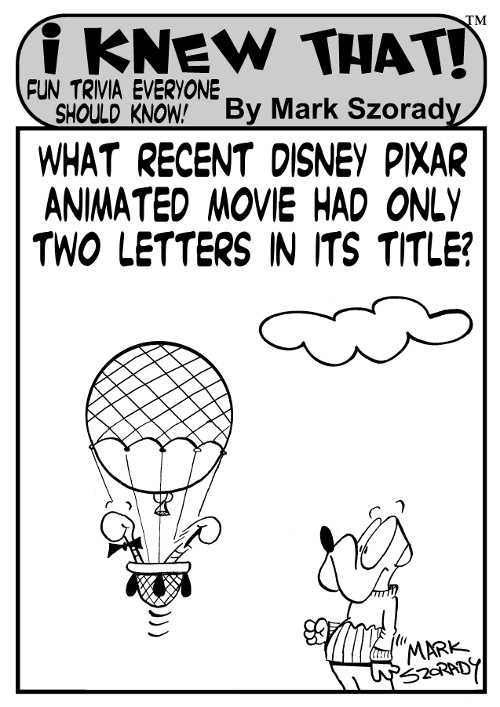
Copyright 2012 Mark Szorady. Distributed by georgetoon.com
What can I say? I love drawing this feature.
I hope you enjoy it as much as I do creating it.
Click, hold down, and move your mouse to the right to reveal the answer)=======> Up
”Comment
Copyright 2012 Mark Szorady. Distributed by georgetoon.com
What can I say? I love drawing this feature.
I hope you enjoy it as much as I do creating it.
Click, hold down, and move your mouse to the right to reveal the answer)=======> Up

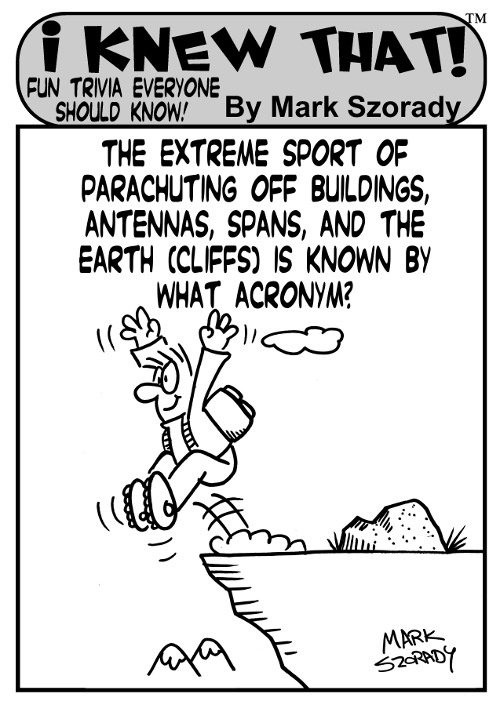
Copyright 2012 Mark Szorady. Distributed by Georgetoon.com
I thought I’d share another I Knew That! cartoon game panel to help jump-start your brain.
Click, hold down, and move your mouse to the right to reveal the answer)=======> BASE jumping. (Building, Antenna, Span, and Earth)
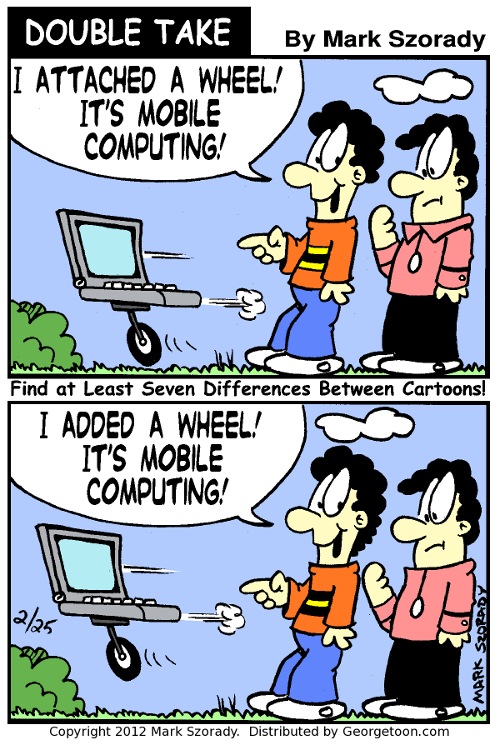 I absolutely love drawing my comic game panel, Double Take.
I figured it’d be a good time, once more, to post another one. Have fun finding the differences.
Click, hold down, and move your mouse to the right to reveal the answer)=======>(1) Hair longer in back; (2) Shirt collar missing; (3) Shirt stripes different; (4) laptop moved; (5) Arm moved; (6) Word balloon different; (7) Cloud moved
 If you recently viewed my blog, you may have noticed an ad in the upper right for the new Google tablet. It’s the Nexus 7 and it even has an Apple iPad user praising it.
This is Google’s first entry into the very competitive tablet market. They upped the ante by setting the price at $199.00 and packing the device with a lot of nice features. It’s a 7 inch tablet with a front facing camera, WiFi 802.11 b/g/n, blue-tooth, hi rez screen (7” 1280×800 HD display (216 ppi)), and a Quad-core Tegra 3 processor.
The big attraction, though, is that the Nexus 7 runs the latest Android OS. Android 4.1, a.k.a. Jellybean.
And because it’s Google, it comes with all your favorite Google apps like Gmail, Chrome, YouTube, and Google+. If you already have a Google account, getting the Nexus 7 up and running is as easy as logging in.
My nephew Mike pre-ordered one and it arrived just yesterday. We’ve been exchanging emails and he’s been sending screen shots. From what Mike is telling me, and the screen shots I’ve seen from its 7 inch screen, this tablet is pretty awesome.
Apple is looking over their shoulder and amazon now has to play catch-up. And it looks like I’m going to have to take down the Kindle Fire ad.

A screen grab from the 1080 HD video shot on the Tansformer Prime
I thought I’d share another video of some of the fireworks that took place over the Fourth of July holiday.
My Asus Transformer Prime caught all the action! It was incredibly easy to do. I just set the focus to infinity, pointed and hit the on screen record button. The Prime took care of the rest.
I was pretty amazed how well the Prime adjusted to the dark skies and then reacted to the light bursts from the fireworks. It captured all the colors with no problems. As you can hear form the video, it did a great job of capturing all the sound, too.
The neat part was, I could simply hold the tablet out in front of me and point it in the general direction of the fireworks. Doing it this way, I was able to capture allthe fireworks on screen and still look out to the sky, seeing it live. Every once in a while, I’d glance to the screen to make sure I still had things framed up.
The result is pretty stunning especially considering it was filmed at night. I didn’t play with any settings (other than setting the focus to Infinity, as mentioned earlier). I just pointed and hit record.
Enjoy the show. (And remember to toggle to 1080 HD.)

| M | T | W | T | F | S | S |
|---|---|---|---|---|---|---|
| 1 | ||||||
| 2 | 3 | 4 | 5 | 6 | 7 | 8 |
| 9 | 10 | 11 | 12 | 13 | 14 | 15 |
| 16 | 17 | 18 | 19 | 20 | 21 | 22 |
| 23 | 24 | 25 | 26 | 27 | 28 | 29 |
| 30 | 31 | |||||
